
自动上传图片到github并替换文件中的url
2022年12月23日 · 669 字
现在使用hexo作为自己博客的主要部署方式,写博客一般是先本地编辑md文件,然后上传到服务进行hexo服务的静态页部署,但是一般情况下如果md文件中需要上传图片的话就比较麻烦,先上传到图床,然后使用图床给到的公网地址编辑md文档,相对来说比较麻烦,所以有了这个脚本,主要目的就是为了解决md文档中使用本地图片如何快速处理的问题。
流程图
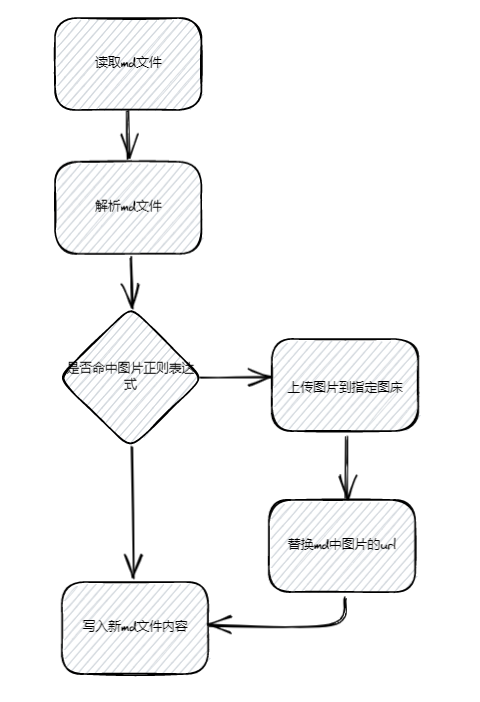
食用方式
申请github token
因为目前使用的图床是github,所以需要使用github的token通过API进行文件上传。
1)登录github,然后访问https://github.com/settings/tokens
2)点击Generate new token

3)输入github登录密码
4)设置token的信息
-
Note:token名称,比如我们是为了上传图片,我设置成了
for_upload_img -
Expiration:过期时间,根据自己情况设置
-
Select scopes:权限设置,我们只需要仓库的权限
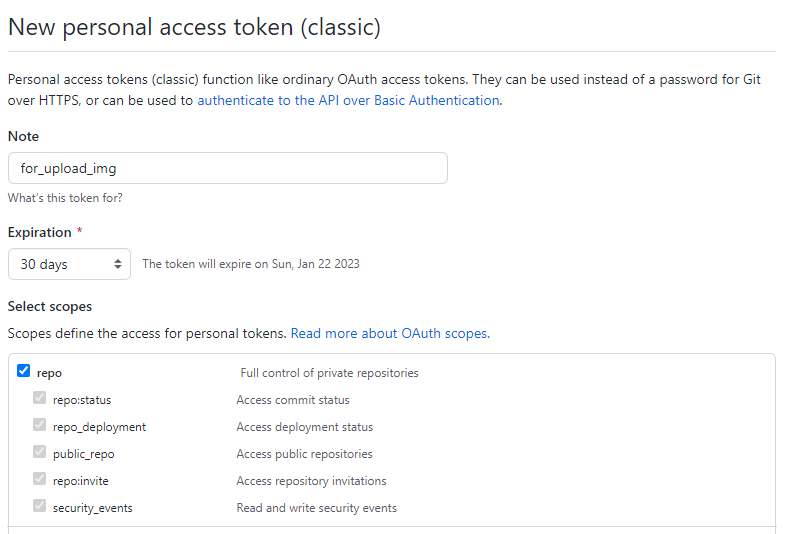
配置token
打开项目的config.ini配置文件,设置对应的配置参数
[github]
token = ghp_xxxxx
user = wxt2rr
repo = images
启动程序
找到main.py,修改需要替换url的文件路径,执行程序即可
if __name__ == '__main__':
    # md文件路径(需要使用绝对路径)
    path = "C:\\Users\\wxt\\Desktop\\test_1223_1735.md"
    # 目标md文件路径
    tar_path = "C:\\Users\\wxt\\Desktop\\test_1223_1735_new.md"
    # 上传到github的根路径
    dir_path = "hexo/" + "test_1223_1735_new"

    # 读取md文件
    lines = reader.read_md(path)

    # 检索md文件中的图片,并替换url
    new_lines = replacer.replace_url(lines, dir_path)

    # 替换md文件
    reader.write_md(tar_path, new_lines)
项目源码
替换url
def replace_url(lines, dirpath):
newlines = []
for line in lines:
print(line)
# 
# 判断是否是图片,如果是的话则将图片上传到github,然后替换成cdn的地址
image = re.match('^!\[([\s\S]*?)]\(([\s\S]*?)\)', line, re.M | re.I)
if image:
filename = image.group(1)
filepath = image.group(2)
url = uploader.upload_file(filename, filepath, dirpath)
line = ""
newlines.append(line)
return newlines
上传图片到github
def do_upload_file(file_data, filename, dirname):
    # 文件名称
    file_name = filename
    token = config.get('github', 'token')
    user = config.get('github', 'user')
    repo = config.get('github', 'repo')
    path = dirname

    url = "https://api.github.com/repos/" + user + "/" + repo + "/contents/" + path + "/" + file_name  # 用户名、库名、路径
    headers = {"Authorization": "token " + token}
    content = file_base64(file_data)
    data = {
        "message": "for_upload_img",
        "committer": {
            "name": "[wangxt]",
            "email": "1471520488@qq.com"
        },
        "content": content
    }

    data = json.dumps(data)
    req = requests.put(url=url, data=data, headers=headers)
    req.encoding = "utf-8"
    re_data = json.loads(req.text)
    print(re_data)

    # https://github.com/wxt2rr/images/blob/main/hexo/aa.jpg
    # https://cdn.jsdelivr.net/gh/wxt2rr/images@main/hexo/aa.jpg
    cdn_url = "https://cdn.jsdelivr.net/gh/" + user + "/" + repo + "@main/" + path + "/" + file_name
    print(cdn_url)
    return cdn_url